U-M Google Updates

Reminder: Convert Google Classic Sites to New Sites

As first announced July 18, Google has an automatic migration tool to transfer from Google classic Sites to new Sites. Although Google has not yet announced a date to end classic Sites, we strongly encourage you to begin converting your classic Sites. This will help avoid a last minute rush and possible loss of your Sites content. A new Site can either be published to the URL of the classic Site (replacing it) or published to a new URL.

You can use the Help Center to find out more about how to convert a classic Site to a new Site and what to expect when you convert a site.

New Ways To Create, Edit, And Share Jamboards On The Web

Hello,

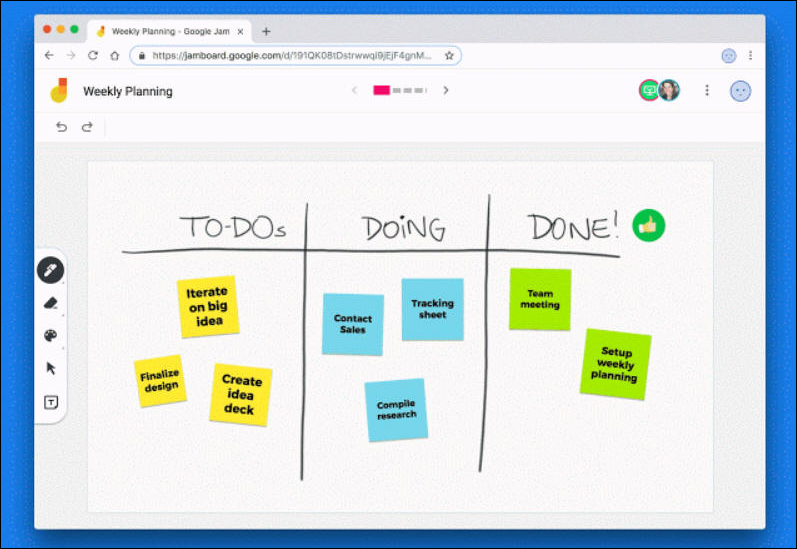
Google is adding two features for Jamboard that will help make collaborating easier and give you more control when you share your work by creating and editing jams from the web.

Create and edit jams in a web browser

Now, you can create and edit your jams on the web. Everybody on your team can join in and collaborate on a session in their web browser. This means that anybody in the meeting can participate, whether they want to edit a sketch from a laptop or add sticky notes during a meeting.

Share and protect work with View Only mode

If you want to share something with others that they can view but not edit, View Only mode is now available for just that. With View Only mode, you can share something and set exactly who has edit access. This is similar to Docs, Sheets and Slides. This will provide a consistent experience no matter what you’re creating and sharing.

REMINDER: New Gmail Starts to Be Permanent Next Week

As first communicated, on August 14, Google announced the new Gmail cutover dates. This is a reminder that beginning Tuesday,October 16, everyone will start to be permanently switched to new Gmail as “classic Gmail” will no longer be available. This should slowly roll out to the UMICH domain over the next several weeks. 

New features include:
smart replies (similar to the Gmail mobile version)
the option to snooze emails (as with Google Inbox)
a new tool panel on the right side of the interface for easy access to Tasks (also revamped) and Calendar

Interested in our latest updates about Google G Suite at U-M? Check out the Google Service Updates page.

Smart Compose Makes Writing Email Faster

A New Way To Write Emails

Using email is a quick and efficient way to share information, communicate, and collaborate with anyone - from colleagues to family. Drafting a new message can take some time, however. Similar to “Smart Reply” in Gmail, which helps draft quick replies to emails, “Smart Compose” is a new Gmail feature that makes drafting emails faster. 

Smart Compose suggests sentences in emails, much like search suggestions in search engines. Write an email like you normally would, and Smart Compose will offer suggestions as you type. To accept a suggestion, press Tab

Smart Compose

Google has clearly stated that Smart Compose suggestions are 100% modeled from consumer (gmail.com) data. Google has also stated that G Suite (umich.edu) data is not stored or used to generate Smart Compose suggestions and it will not show up in a Smart Compose suggestion.

Opting Out 

The Smart Compose feature can be turned off on the General tab in Settings.

A Friendly Reminder: Check Your SPAM Folder Periodically

When was the last time you checked your spam or junk email folder? Once in a while, a legitimate email can be sent to your spam folder instead of to the Inbox. We recommend you check your spam folder periodically for legitimate emails that may have been sent there by mistake. If you do find a message that has been accidentally marked as spam, you can select it and click Not Spam at the top of your inbox to help ensure that future messages from this sender are not flagged as spam. Additionally, adding colleagues to your Google Contacts can help with mail delivery.