U-M Google Updates

Google Chat for Gmail is now available!

Starting today, Google Chat has replaced classic Google Hangouts in Gmail and is now the default option for direct (one-to-one) messages, small group messages, and team-based room discussions within Gmail. 

For several years, classic Google Hangouts had been a part of Google at U-M and integrated with Google Mail. Google Chat is an updated, team-based experience and better integrates with G Suite. Refresh your browser to get started using Google Chat in Gmail. Visit the U-M Google Chat FAQ for answers to commonly asked questions.

ITS strongly recommends the use of Google Chat rooms for team-based work. Group messages are still available for smaller, private conversations. (You will need to recreate any group messages you may have used in classic Hangouts.)

How does this affect me?

What about communicating with people outside of U-M?

  • Google Chat group messages and rooms will not send messages to people outside of U-M who are still using classic Hangouts. 
  • Google Chat rooms can include people from outside the university. But, if they are not already using Google Chat they will not be able to see the message in classic Hangouts and will need to open Chat through chat.google.com. Additionally, they will not be able to see room messages in classic Hangouts. 
  • Group messages created in classic Hangouts with people outside of U-M need to continue in classic Hangouts.
  • Learn more about communicating with people outside the university on Chat.

What about calling and video conferences?

  • Phone calls can continue to be made in classic Hangouts. Phone calls cannot be made from Google Chat.
  • Google Meet is now the default video conferencing option in Google Chat. Video calls made in classic Hangouts are converted to a Google Meet session, sending the Chat user a link to the meeting. 

Additional resources:

Google Chat for Gmail is arriving July 15

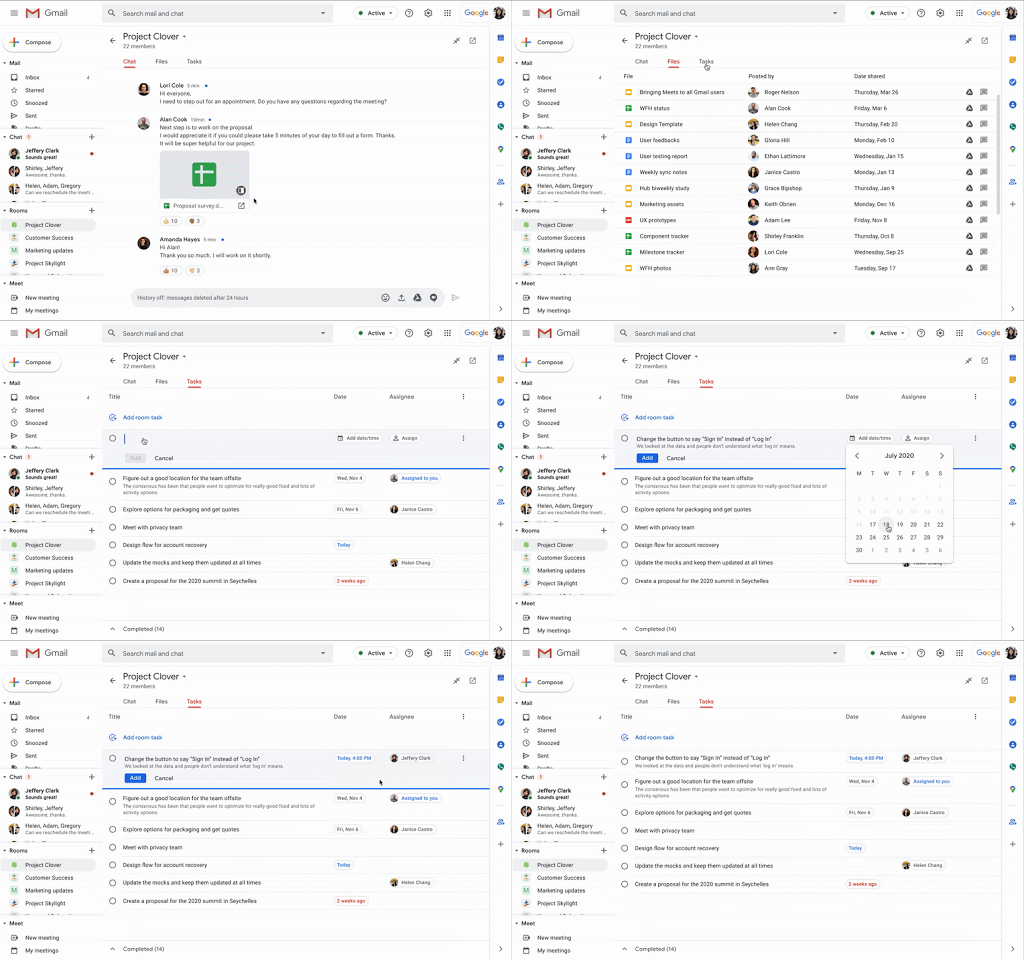
We are excited to announce that Google Chat will be replacing classic Google Hangouts in Gmail! Google Chat is an evolution of classic Hangouts, adding additional features that let you chat with individuals, send group messages, and engage in team-based collaboration with rooms across the entire university community and externally.

Starting July 15, 2020, Google Chat will become the default option for direct (one-to-one) messages, group messages, and team-based room discussions within Gmail. When this happens, all previous classic Hangouts desktop, mobile, and browser applications will be disabled, and you will be directed by Google to go to chat.google.com or to download the Google Chat mobile app.

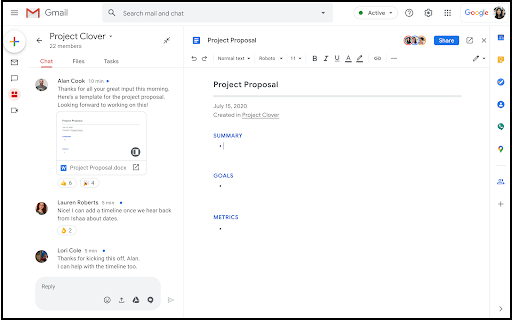
Screenshot of the new Google Chat in Gmail interface. Focus bubble over left sidebar where Chat is now located.

What will happen to my classic Google Hangouts chats/messages?

  • All previous one-to-one message history from classic Hangouts will remain accessible in Google Chat. However, this does not include group messages.
  • If you wish to keep group messages between multiple people from classic Hangouts, you will need to manually create a new group message (for smaller, private conversations) or room (for larger, team-based work) in Chat and invite the previous participants. Unfortunately, content from group messages in classic Hangouts does not migrate to Google Chat.
  • According to Google, you will still be able to view your old classic Hangouts one-to-one and group messages at hangouts.google.com as read-only.

What should I do to prepare?

  • Visit chat.google.com to explore the new interface.
  • Download the mobile application.
  • Re-create any existing classic Hangouts group messages that you wish to continue in Google Chat as a new Chat group message or room.
  • On July 15, 2020, refresh your browser to use the new Google Chat in Gmail interface.
Note: It may take up to 24 hours for the new Google Chat to appear in Gmail for everyone at U-M. You will no longer be able to use or revert back to classic Hangouts.

For more information on Google Chat and its current limitations, see Getting Started with Google Chat.
For answers to commonly asked questions, see the U-M Google Chat FAQ.

To learn more about Google Chat, visit:

U-M Google June Monthly Summary

The monthly U-M Google summaries inform the university community of Google releases. We communicate important information throughout the month.

Updates:

Google is updating the Google Docs editors and Drawings interface which tells you about the file save status and whether you’re working online or offline. This is an update to the interface only - there are no changes in the functionality.

The changes you may notice include:

  • A new location for the document save status next to the document name. 
  • A more descriptive text to indicate whether a document is saved to the cloud (when online) or to the device (when offline). 
  • A new way to enable offline by clicking on the document status icon. Previously, you had to go to File > Make available offline.

Screenshot of the new indicators for save and offline statuses in Google Docs.

Google is updating the user interface for comments and action items in the Google Docs, Sheets, and Slides mobile apps for Android.

The changes you may notice include:

  • Larger, clearer interface to make it easier to see comments and their context in a document. 
  • Shortcuts and gestures to help you quickly scroll through and respond to multiple comments. 
  • Quick access button to reply, “@” mention someone, and assign action items.
  • Improvements to layouts in Google Meet

Google is making improvements to the Google Meet Tiled layout to allow you to see other attendees even when someone is presenting. Presentations will appear in a large tile, with the most active participants to the side or bottom. When you choose a new layout, this layout will be automatically saved as your preferred layout. This means it will be automatically applied for your future meetings until you select a new one. Google has also made some minor improvements to the Meet interface to better utilize the space on your screen.

  • Share to Classroom and Cast for Education Chrome extensions are being discontinued

Google will be discontinuing the Share to Classroom and Google Cast for Education Google Chrome extensions on August 15, 2020. The most common uses for these two extensions can be replicated with the tools and features offered by Google Classroom, Docs editors, and Meet.

Google is adding a few new features to help you customize chart axes in Google Sheets and better visualize your data in charts.

The new options are:

  • Add major and minor tick marks to charts. 
  • Customize tick mark location (inner, outer, and cross) and style (color, length, and thickness). 
  • Set the precise numeric spacing between major and minor axis ticks or grid lines. 
  • Choose to show or remove the line that marks the axis.

Reminder: Google Cloud Print Ending Dec. 31

You may disregard this message if you do not use Google Cloud Print.

This is a reminder that beginning January 1, 2021, devices across all operating systems will not be able to print using Google Cloud Print. We recommend that you find an alternative print solution and migrate your print services by the end of 2020. One alternative, MPrint, is U-M's printing service that allows campus community members to print from their computer or mobile device to many printers on campus. Note: Due to COVID-19, many printers are unavailable across the university. To find a list of available printers, see the Shared Computing Site Directory - COVID-19 Temp Operations spreadsheet.

Google Currents will replace Google+ on July 6, 2020

Google has announced they will be transitioning Google+ over to an updated service called Google Currents. Starting on July 6, 2020, you will begin to lose access to Google+ and all existing communities will begin the transition to Currents. No action is required by you or your team.

Picture of an open laptop and mobile phone, each showing the new Google Currents dashboard.

Google Currents is a rebranding of Google+ with an updated interface and a set of new features. Currents offers a more streamlined experience to collaborate on and exchange ideas across the university. For more information, see Get started with Currents.

What should I expect?

  • All users and existing Google+ content will be automatically transitioned to Currents.
  • All existing links to plus.google.com will continue to work. These links will automatically be redirected to currents.google.com.
  • The Google Currents Android and iOS apps will replace Google+’s mobile apps, which will no longer be supported. Within your Google+ app, you will be prompted to upgrade to the new Currents app to continue to use the service on mobile. If you have auto-update enabled on your phone, your app will be automatically upgraded to Currents.
  • In the days prior to the transition, you may see a banner in Google+ notifying you of the launch of Google Currents. The banner will also include links to relevant G Suite Help Center articles.
  • There will be no option to revert back to Google+.

According to Google, this transition will begin on July 6, 2020, and could take 5 days or longer to complete.